How to build a paid subscription newsletter with EmailOctopus
Thanks to the internet, writers have more opportunities than ever to grow an audience and deliver premium content. And make good money while doing so.
In the early noughties, blogging was the primary modus operandi for digital publishers. But in more recent years, email has become the new platform of choice. And paid subscription newsletters are how writers from all sorts of backgrounds are generating recurring revenue and building a niche readership.
Page Contents
What is a paid subscription newsletter?
A paid subscription newsletter is an email that people pay a monthly or yearly fee to receive. These newsletters are usually focused on a specific niche and provide readers with exclusive, premium content. Subscription newsletters are regular too, and could be sent out daily or a few times a week.
Why start your own paid newsletter?
Premium newsletters have been around for years. But recently, easier and cheaper access to email and audience building tools has caused a spike in interest from solo creators and freelance writers.
Here’s a few more reasons why paid newsletters are booming:
Email is one of the best ways to reach people
Inboxes are often seen as an overcrowded graveyard of unopened messages. Yet it’s still one of the best channels to reach your audience. Newsletters can enjoy open rates of between 40-50%, which beats the paltry organic reach social media channels deliver.
Email is also a more direct form of communication with your audience. Which means engagement is usually much higher than other channels too. And it’s engagement that you need in order to keep income coming in.
You have more creative freedom
For solo creators and freelance writers, a newsletter is a very personal outlet – it’s their voice, their point of view and their hard work. And when you own the channel, you have more freedom. You can write about whatever you want without having to worry about appeasing editors.
And when you use a subscription newsletter business model for a recurring income, you can ditch the need for classified ads or sponsorships to bring in revenue. Which gives you even more control over the content of your newsletter.
Newsletters are easy to scale
Want to make more money from your paid subscription newsletter? Easy! All you need to do is increase your number of subscribers.
Granted, it takes some work to grow your audience. But you don’t need to create more content, hire extra people or spend loads of money on more tools to do that. Once you’ve got your subscription newsletter set up and a new edition ready to send, you can send it to as many subscribers as you can get.
How to launch your first paid newsletter
If you’re convinced and ready to start publishing your first paid newsletter, follow this step-by-step guide to get you from idea to action.
The ideation and planning stage 💡
Step 1: Define your ‘why?’
Before you go any further, you need to be able to answer these two important questions:
- Why are you publishing this content?
- And why would anyone pay you to read this content?
Be clear on the purpose of your paid newsletter and what value you will bring your audience. You should be able to answer these two questions in a succinct sentence – it will come in handy when you start designing your newsletter landing page. And it will keep you focused as you start to publish your content.
Step 2: Choose your ‘what?’
You understand your motivations, so now you need to choose your topic. This could be broad or a narrow niche. Think about the unique knowledge you possess and what might be of value to others.
The most successful newsletter publishers are the ones that pick a subject that they are passionate about. After all, you’ll be spending a big chunk of your time writing these newsletters. So they need to interest you most of all. And the more passionate you are about your topic, the more your audience will feed off of that passion.
Step 3: Define your ‘who?’
Next, you need to define your audience – who is going to be interested in your newsletter content? Who exactly are you writing for?
Having a complete picture of the type of person you’re writing for will keep your overall messaging coherent. And knowing your audience will help you find that audience in the first place.
Step 4: Decide on your ‘how?’
Now you need to firm up how you’re going to deliver your newsletter to your audience. First, start with how often you plan to send your newsletter – is it going to be daily? Once or twice a week?
Or will it be a longer newsletter sent just once a month?
Be honest with your time limitations and start with a schedule you know you can stick to. You can always increase frequency as you build your newsletter.
Then decide how much you’re going to charge for your subscription newsletter. The ideal price point is one that’s profitable for you and affordable for your subscribers. On average, newsletter subscriptions range from $5 to $10 per month, with a discounted rate for annual subscriptions.
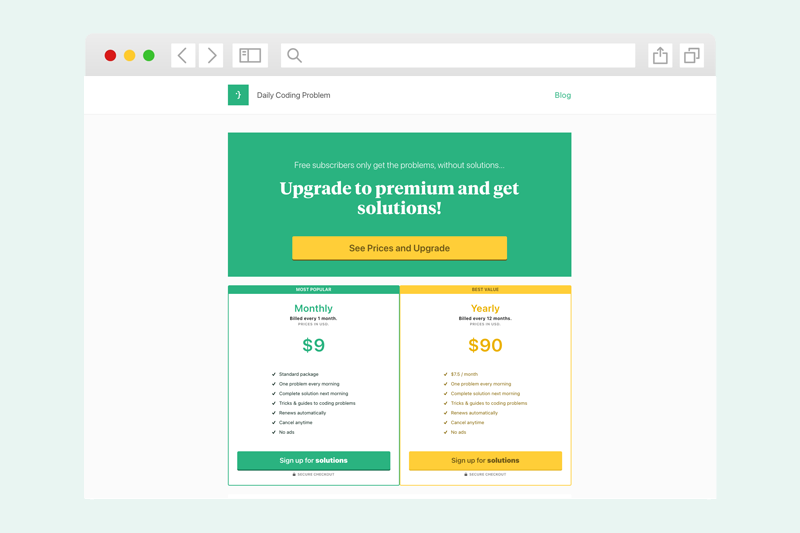
Annual subscriptions are a great way of locking in revenue, but it is quite a commitment – for both you and the subscriber. Especially when you’re just starting out. It’s always something you can introduce later on.
For monthly subscriptions, you might want to charge more if you’re planning on publishing premium long-form content on a more regular basis. Or if you want to throw in extra perks, such as community access or additional resources.
The action and implementation stage 🥊
Step 5: Set up your newsletter
Now it’s time for action! To get started with your newsletter, you’re going to need to:
- Buy a custom domain to host your newsletter – ideally, your domain will be www.nameofnewsletter.com so that you own the name and all SEO value you accrue.
- Create an account with your preferred email publishing tool – we recommend EmailOctopus for ease of use and low price (more on that later), but there are plenty of other options out there.
- Verify your domain – you should be able to do this in most email platforms, and here’s how to verify your domain in EmailOctopus.
- Design your email newsletter – this is the fun part and where you get to decide what your newsletter will look like, and how you lay out your content.
- Set up an automated email to welcome new subscribers – a great welcome email tells new subscribers what to expect and reminds them why they signed up. Every newsletter creator should have one!
- Build your newsletter landing page with a customised sign up form – this is how you’re going to collect new subscribers. Many email publishing tools have an in-built landing page builder, but for more flexibility and creative control, we recommend Carrd.
For more detailed instructions on how to do all this, check out our guide to creating your first email newsletter.
Step 6: Grow your audience with free newsletter content
It can be a challenge persuading a new audience to pay for content without first giving them a taster of what they can expect. You need to prove yourself first. And the best way to do that is to start with free access to your newsletters.
Before introducing a paid tier, build a loyal subscriber base. It doesn’t have to be huge – even a hundred or so subscribers is enough to move forward with a subscription business model.
This also gives you an opportunity to perfect your value proposition and newsletter writing style. Plus, it gives you a few editions that you can share on your landing page as a way to entice even more subscribers.
In order to grow your audience, you’ll need to promote your newsletter. Your personal social media channels and organic network are a great place to start. And submitting your newsletter to newsletter directories and aggregators is a great way to reach a much wider audience.
Step 7: Set up a Payhip account
By this point, you’ve built your newsletter, grown an early audience and have a few newsletter editions behind you. Which means it’s time to introduce your subscription business model and start making a profit from your hard work.
For that, you’ll need a membership management platform. And Payhip is our top choice. It’s the easiest way to run a subscription newsletter and earn recurring revenue, without having to deal with a single line of code.
Payhip integrates directly with EmailOctopus so new subscribers will be automatically added to your mailing list, ready to receive your next newsletter edition. Plus, Payhip integrates directly with both Stripe and Paypal for payment processing. You’ll need either PayPal or Stripe to start collecting payments, or you can use both.
You also have the ability to customise your checkout page and add multiple pricing tiers. Best of all, subscribers can manage their subscriptions via Payhip’s members area. Here they can view their billing history, update their card details and cancel their subscription. Which makes your life as a newsletter creator much easier.
Read our help article for more details on how to connect Payhip with EmailOctopus.
Step 8: Add subscription checkout to your landing page
By this stage, you have everything you need to start selling your subscription newsletter – you’ve got your newsletter up and running, you’ve got a landing page for sign ups, and you’ve got a membership platform ready to start managing paying subscribers.
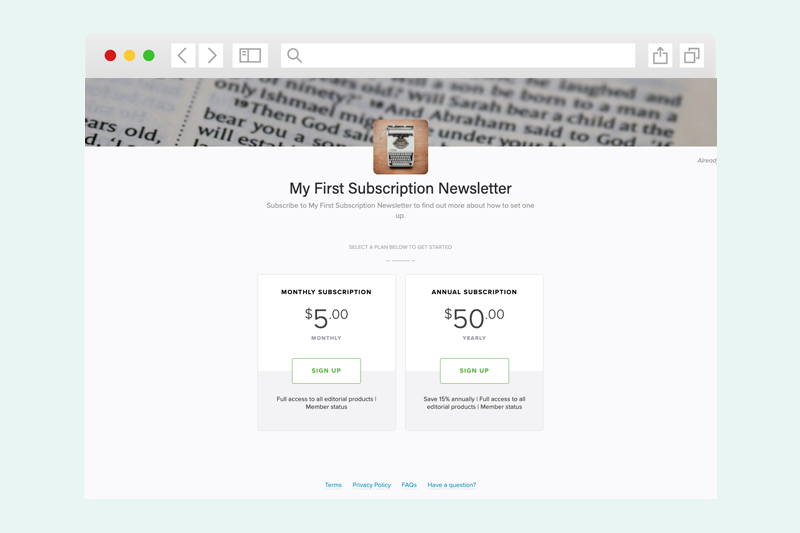
Now all you have to do is merge it altogether. Thankfully, this is really simple as Payhip creates a product page with a unique URL. And you can link to this page from your newsletter landing page. Alternatively, you can embed a checkout button directly onto your website.
One final step…
With any type of subscription, there’s the likelihood that subscribers will one day cancel. And so the final step in the process is preparing for that eventuality.
For this you’re going to need Zapier.
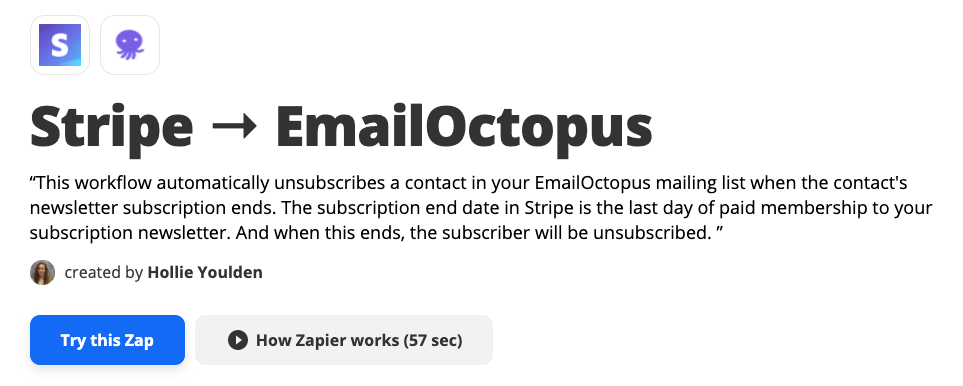
Zapier is an automation tool that connects various applications and builds workflows. For your subscription newsletter, you’ll need Zapier to feed data from Stripe into EmailOctopus so that when a subscriber cancels their membership, they will be unsubscribed from your newsletter on the day their next payment is due.
We’ve done the hard work for you and created a Zap template for you to use. All you need to do is connect your Stripe and EmailOctopus accounts, and it’s ready to go!
Why choose EmailOctopus for your paid subscription newsletter?
We’ve told you how to build a paid subscription newsletter using EmailOctopus, Carrd, Zapier and Payhip. But you’re probably wondering why you would bother setting up a tech stack of four different platforms when you can just go with a platform like Substack or Revue, with everything you need rolled into one.
Well, there are a few reasons that we’re about to dive into.
Reason #1: You’ll make more money with EmailOctopus
Most writers and digital publishers decide to launch a subscription newsletter to make money doing what they love – writing. And today, some of the most successful newsletter creators earn more money from their newsletters than they did working full-time in a salaried job.
But you need software to run a newsletter. And software costs money.
You might think combining four different platforms to build a paid subscription newsletter would mean higher costs and less profit. But with EmailOctopus, it actually works out the opposite – lower costs and more profit for you.
Let’s look at a few numbers to see just how much more profit you could be making.
The following tables show you how much you’d earn in revenue based on your number of subscribers and how much you might charge per month for your subscription newsletter. To keep things simple, we’re looking at a time period of one month – so let’s imagine it’s your first month of launching your subscription newsletter.
Your potential revenue using EmailOctopus
EmailOctopus charges you based on your total number of subscribers. And it’s completely free for your first 2,500 subscribers – ideal if you’re just starting out and wanting to maximise profit.
After that milestone, prices start from just $20/month and increase as you grow your audience. But what’s great about EmailOctopus is that you’re not charged a cut of your profits – any money you make from your subscription newsletter is yours to keep.
Using EmailOctopus to publish your subscription newsletter does require Payhip to create a checkout page and manage subscriptions. But Payhip offers three pricing plans, and that gives you the option to upgrade when one tier becomes less cost effective.
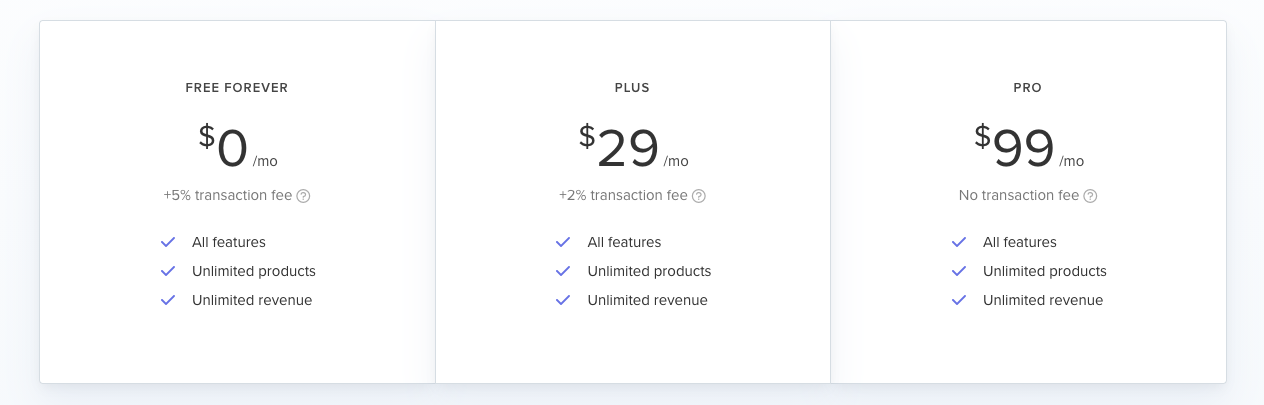
Essentially, you’ll never pay more than $99 per month to use Payhip – regardless of how big your mailing list grows. Or how much you charge new subscribers. And the Pro plan also gives you unlimited digital products, great if you’re thinking of expanding with more paid content in the future.
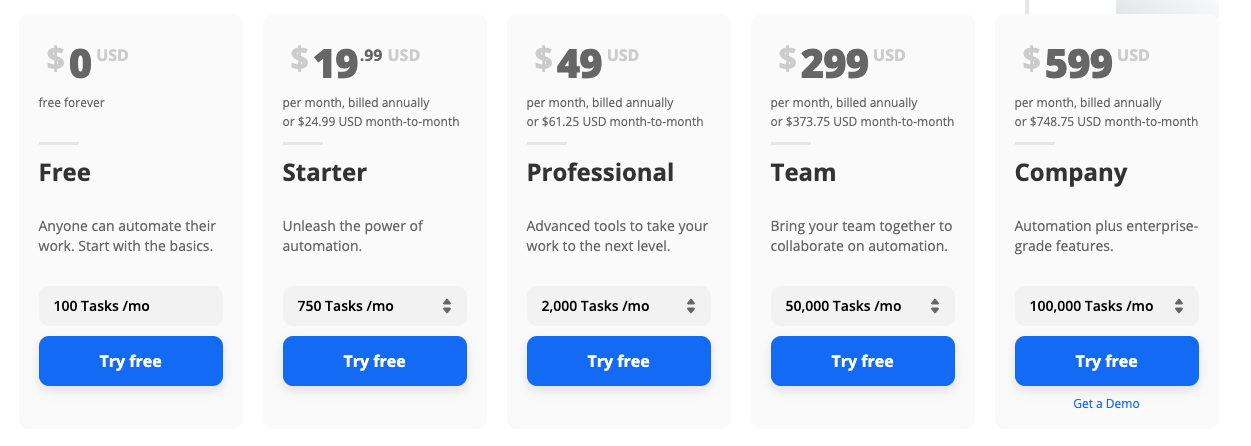
Zapier is free for up to five zaps and 100 tasks per month. For this particular subscription newsletter set up, you’ll only need one zap. And unless you have a high unsubscribe rate, this free plan should cover you. Essentially the free plan allows for 100 unsubscribes each month. More than that, and you’ll need to upgrade to the Starter plan.
Adding these prices all up, the table below shows you how much profit you’ll make with this setup. I’ve used the most cost effective Payhip plan based on your revenue. And ignored Zapier fees for the time being as you won’t need to start paying for this until your mailing list is much larger or if you’re losing more than 100 subscribers a month. I’ve also assumed a weekly newsletter schedule – if you plan to send your newsletter more than once a week, then EmailOctopus fees may vary.
| Subscriber count | What you charge readers | Stripe fee | Payhip fee | Email Octopus fee | Your profit |
|---|---|---|---|---|---|
| 2,000 | $5.00 | $890.00 | $49.00 | $0.00 | $9,011.00 |
| 2,000 | $8.00 | $1,064.00 | $99.00 | $0.00 | $14,837.00 |
| 5,000 | $5.00 | $2,225.00 | $99.00 | $20.00 | $22,656.00 |
| 5,000 | $8.00 | $2,660.00 | $99.00 | $20.00 | $37,221.00 |
| 10,000 | $5.00 | $4,450.00 | $99.00 | $30.00 | $45,421.00 |
| 10,000 | $8.00 | $5,320.00 | $99.00 | $30.00 | $74,551.00 |
Your potential revenue using Substack
Unlike EmailOctopus, Substack does not charge a flat rate for using their platform based on subscriber count. Instead, Substack takes a 10% cut of your revenue. Whatever money you make from your subscription newsletter, you’ll be paying 10% of that to Substack. And this can add up to a substantial figure as you grow.
On the plus side, Substack provides you with the tools you need to manage subscriptions in the one platform. But even without the need of an additional platform like Payhip, you’ll miss out on revenue using Substack.
Compared to EmailOctopus, that figure could range from a loss of profit of $900 to $7,870 per month, depending on your subscriber count.
| Subscriber count | What you charge subscribers | Stripe fee | Substack fee (10%) | Your final profit |
|---|---|---|---|---|
| 2,000 | $5.00 | $890.00 | $1,000.00 | $8,110.00 |
| 2,000 | $8.00 | $1,064.00 | $1,600.00 | $13,336.00 |
| 5,000 | $5.00 | $2,225.00 | $2,500.00 | $20,275.00 |
| 5,000 | $8.00 | $2,660.00 | $4,000.00 | $33,340.00 |
| 10,000 | $5.00 | $4,450.00 | $5,000.00 | $40,550.00 |
| 10,000 | $8.00 | $5,320.00 | $8,000.00 | $66,680.00 |
We ran these same calculations comparing Revue and ConvertKit, and the EmailOctopus + Payhip combo still came out on top in terms of your final revenue.
Please note: All fees correct at time of publishing. Prices do change so check with each platform for most up-to-date calculations.
Reason #2: You’ll always need a separate payment processing platform
Whether you opt for Substack or EmailOctopus, or another alternative such as Revue, you’re going to need a payment processing platform. None of these options come with an in-built solution. So whichever one you use, you’ll need to pay transaction fees. With Stripe, those fees amount to 2.9% + $0.30 per transaction.
Substack and Revue charge you a flat 10% and 5% respectively on your revenue. And this is why EmailOctopus is a much cheaper alternative – we only charge you for your total number of subscribers. We don’t charge you for making money from your content.
Reason #3: You’ll have more control
Relying on one platform that was built specifically for running a subscription newsletter has its advantages. But it also comes with its limitations, namely how much control you have over your newsletter.
Let’s break that down.
Control over the look of your newsletter
It’s true that Substack and Revue have in-built landing page editors for creating your newsletter sign up form. But editing options are limited. And they tend to look the same – it’s hard to distinguish one Substack newsletter from another in terms of design and layout.
If you want complete creative freedom, Carrd gives you all the tools you need to build stunning one-page websites. There’s the option to add blocks, which allows you to create a ‘thank you’ page to show subscribers after they’ve signed up. And you can create an archive of previous editions of your newsletter too. All for just $49 for the year.
If you need further convincing of the options available with Carrd, take a look at BrainPint – it’s a newsletter sign up page built with Carrd.
Control over your SEO value
Another benefit is that with Carrd, you can use your custom domain and keep all SEO value you accrue. Revue allows you to use a custom domain at no extra cost. But Substack charges you a one-time $50 fee per publication.
Using EmailOctopus also gives you the option to create a more substantial website. You can grow beyond a one-page website with little more than a sign up form and archive of previous editions. Instead, you have the option to create an entire website with a searchable directory of your newsletter content.
Control over your list
One final advantage is that with an email marketing platform like EmailOctopus, you have more advanced features at your disposal. You can build multiple lists, create time-based autoresponders and segment your list using custom fields, for when you need to deliver different content to different people.
You can also integrate your list with other software, whether that’s a website built on WordPress or a survey form builder like Typeform.
This gives you much more flexibility in the long-term. Especially if you might want to turn your subscription newsletter into something more akin to a media company later down the line.
Payhip also has an in-built referral feature that you can use to incentivise subscribers to share your newsletter with their network. Which will earn you more sales and more subscribers. This is a feature that Substack lacks and it’s not something you can integrate with either.
Control over additional revenue streams
With Substack, you make money by charging your readers a fee to subscribe to your newsletter. Advertising is not part of the equation.
So if you want to bolster your revenue with advertising, EmailOctopus is a better option. With EmailOctopus, you can see individual link clicks in order to share stats with advertisers. And you have more options in terms of how ads appear in your newsletter using the HTML email editor.
Rounding up
If you’ve made it this far, congrats! You now know what a paid newsletter is and why you might want to start one. And you’ve considered why a broader tech stack might benefit you in the long run.
But more importantly, you know what you need to do to build a paid subscription newsletter. From idea to action, you have all the info you need to get started.
So now all that’s left to do, is to do it! Let us know how you get on – share your subscription newsletters in the comments below.