Emails landing in spam is probably the biggest nightmare for email marketers or anyone who relies on email marketing to grow their business or communicate with customers and prospects.
While most of the reasons behind this can be easily fixed with little investigation and effort, some cases do require extra attention and monitoring. So let's walk through the common causes and exactly what you can do about them.
How to tell if your emails are going to spam
Before you can fix the problem, you need to confirm it exists. Here are the key warning signs to look out for.
Check metrics for signs
If your email metrics show sudden changes, like low open rates, your emails might be going to spam. In addition to low open rates, there are other metrics that can also give a hint whether your emails are landing in spam or not.
Other metrics to look for:
- High bounce rates - Too many hard bounces indicate poor list quality, which can harm your sender reputation with internet service providers (ISPs).
- Rising spam complaints - Even a few spam complaints can cause harm. Try to keep your complaint rate under 0.1%. You can track this data using tools like “Google Postmaster,” but you'll need to verify your domain first.
Tools to check your spam status
There are also some email testing tools that show what's happening with your email based on your content, domain reputation, and more.
- Email testing services - Tools like Mail-tester.com, MailGenius, and GMass's Email Deliverability Tester let you send a test email and get a full report on your spam score, authentication issues, and blocklist status.
- Inbox placement testing - Advanced inbox placement tools show you exactly where your email lands across major providers like Gmail, Outlook, and Yahoo; whether it’s the primary inbox, the promotions tab, or the spam folder.
- Blocklist checkers - Use tools like MXToolbox to see if your domain or IP has been added to any public blocklists.
Common reasons email land in spam
Emails can end up in spam for various reasons, sometimes due to one issue or a combination of several. Let's look at the most common causes and learn how you can spot and solve them.
Incorrect SPF setup
SPF (Sender Policy Framework) is a DNS record that tells email providers which servers can send emails for your domain. If it's not set up correctly or if it's still linked to an old email tool after a migration, then your emails might be marked as suspicious.
At EmailOctopus, you don't need to manually set up SPF TXT records. We only need you to configure a few CNAME records, and we'll handle the SPF record for you. If you're using a different tool, then you might need to set up the SPF record manually.
Incorrect DKIM setup
DKIM (DomainKeys Identified Mail) adds a digital signature to your emails, allowing receiving servers to verify the message hasn't been tampered with.
Setting it up is usually straightforward, just follow your email tool's DNS set up guide and that’s all. However, a common mistake that most people do is that they setup DKIM only for their root domain (e.g., example.com) while also sending from subdomains (e.g., mail.example.com or sales.example.com).
If you send from subdomains, make sure each subdomain has its own valid DKIM record too.
Missing or incorrect DMARC record
DMARC works alongside SPF and DKIM to help email providers verify your messages are genuine. Since 2024, Gmail and several other major providers have made DMARC mandatory.

If you haven't updated your DNS records recently, a missing or broken DMARC record could be the reason your emails are landing in spam. It's worth checking this as a priority.
Poor domain reputation
Your domain reputation (also called a sender score) is calculated based on factors like how long your domain has been active, your sending history, and engagement rates. A low score means a higher chance of landing in spam.
You can check your domain's reputation using Google Postmaster Tools, simply verify your domain, and you'll be able to view your sender score. Talos Intelligence is another option worth exploring.
Domain in blocklist
If your domain or sending IP has been added to a public blocklist, email providers will block your messages outright. Most email clients like Gmail and Hotmail use these blocklists to block spam emails.

Use MXToolbox to quickly run a check across multiple blocklists. If you're listed, most blocklists have a removal process you can follow. Just search for “<Blocklist Name> removal request form” on Google to find the removal form, which is available for almost all blocklists (except a few that have an automatic removal flow).
Poor list engagement
Email clients monitor user actions like how often emails are opened, how often links are clicked, and spam complaints. If recipients keep marking a sender's emails as spam or don't interact with them, future emails from that sender might be marked as spam.
To fix this, clean up your list, make unsubscribing easy, and wait for things to improve.
An automated welcome email series is an excellent way to increase engagement. Subscribers receive an email immediately after signing up, when they are most likely to interact. Your welcome email can include a quick overview of the types of emails to expect, a little information about the brand or newsletter, and possibly a discount code if it's for an e-commerce brand.
Spam traps in your list
Spam traps are email addresses set up to identify senders who engage in malicious activities like purchasing email lists or collecting/scraping email addresses from the web to send unsolicited marketing emails.
Types of spam traps:
- Pristine spam traps: These are addresses that have never used by a real person
- Recycled spam traps: There are old addresses which are being reused to catch senders who don't send emails to list acquired via malicious activities.
To avoid spam traps:
- Use double opt-in to confirm new subscribers are real.
- Send re-engagement emails to inactive subscribers. For example, ask if they still want to hear from you if they haven't opened your last five emails.
- Don't buy email lists or add people to your list without their consent.
- Use an email validation tool like ZeroBounce to remove invalid addresses from your list (only where you have permission to do so).
EmailOctopus supports double opt-in, making it easy to keep your list clean from the start.
Spam triggering content
Certain words and phrases are well-known spam triggers, such as “make money online,” “free cash,” or “online betting.” Additionally, linking to low-quality or spammy websites in your emails can also trigger the spam filters.
So always review and double-check your email copy before hitting send. You can also run your email content through ChatGPT and ask it to check if there are any spam triggers.
Note: LLMs like ChatGPT can sometimes give wrong results, always double check.
Unsafe attachments
Like your email content, attachments can also cause your marketing emails to go to spam. Avoid attaching installable software packages (.apk, .dmg, etc.) or files you're unsure about. Instead, share direct links to the app stores.
Inconsistent sending volume
If you send 50 emails one week and 50,000 the next, it can cause problems. ISPs prefer when the number of emails you send is consistent or grows gradually.
When you need to send more emails, start by sending a small amount and slowly increase it. This gradual increase is known as “warming up” your sending domain.
Typo squatting domain
Domains that mimic well-known brands, like “claube[.] ai” (similar to Claude.ai) or “amazon-reviews[.]com” (similar to Amazon.com), can be identified as fake, intentionally or not. This can cause spam issues and legal issues due to trademark violations.
If your domain is even a little similar to a well-known brand, reconsider using it.
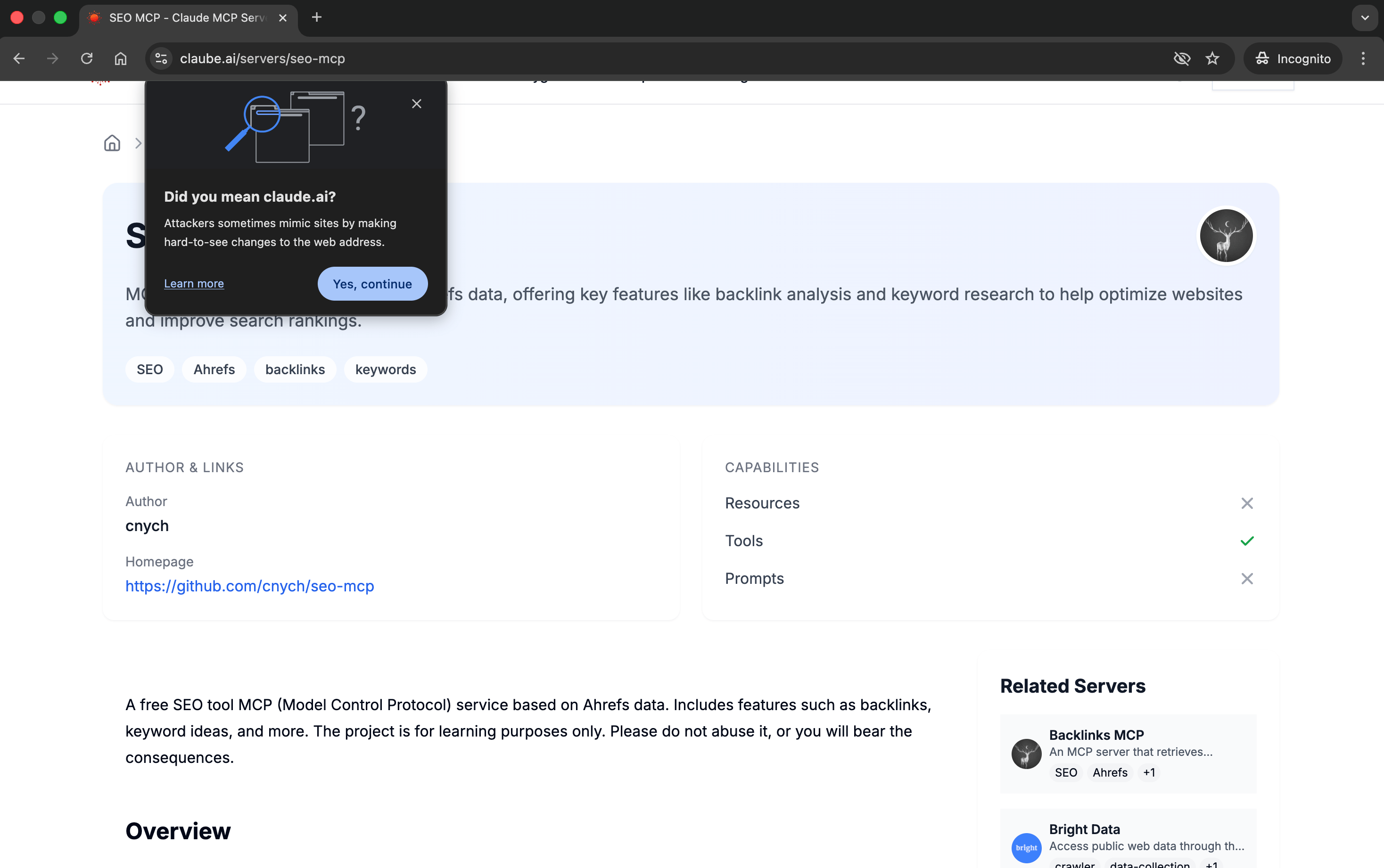
Example of a real website being marked as possible spam by Chrome; the same can happen with Gmail too.
Best practices to stay out of spam
Keeping your emails out of the spam folder is easy if you follow these simple steps:
- Set up SPF, DKIM, and DMARC correctly
- Include a visible, working unsubscribe link
- Never email bought or scraped contact lists
- Test your emails before sending with tools like Mail-tester.com
- Avoid linking to low-quality or spammy websites
- Use safe attachment types, such as PDFs and standard docs
- Maintain a consistent sending volume
Also, if you’re looking for a reliable and easy to use email marketing tool, then do give EmailOctopus a try – it’s entirely free for up to 2,500 subscribers and 10,000 emails per month. Plus, paid plans start from just $9 per month.